Work Orders
Request work in a few taps and approve the price up front. We handle the rest, and you see before-and-after photos when it’s done.
Spend less time managing your cleaning company. Request work, see photos from every cleaning, and flag a problem in seconds. Our team takes it from there, and photo reports come to your inbox automatically. Every location, one login, from any phone.
Available to PCP Cleaning clients. Access is invite-only.
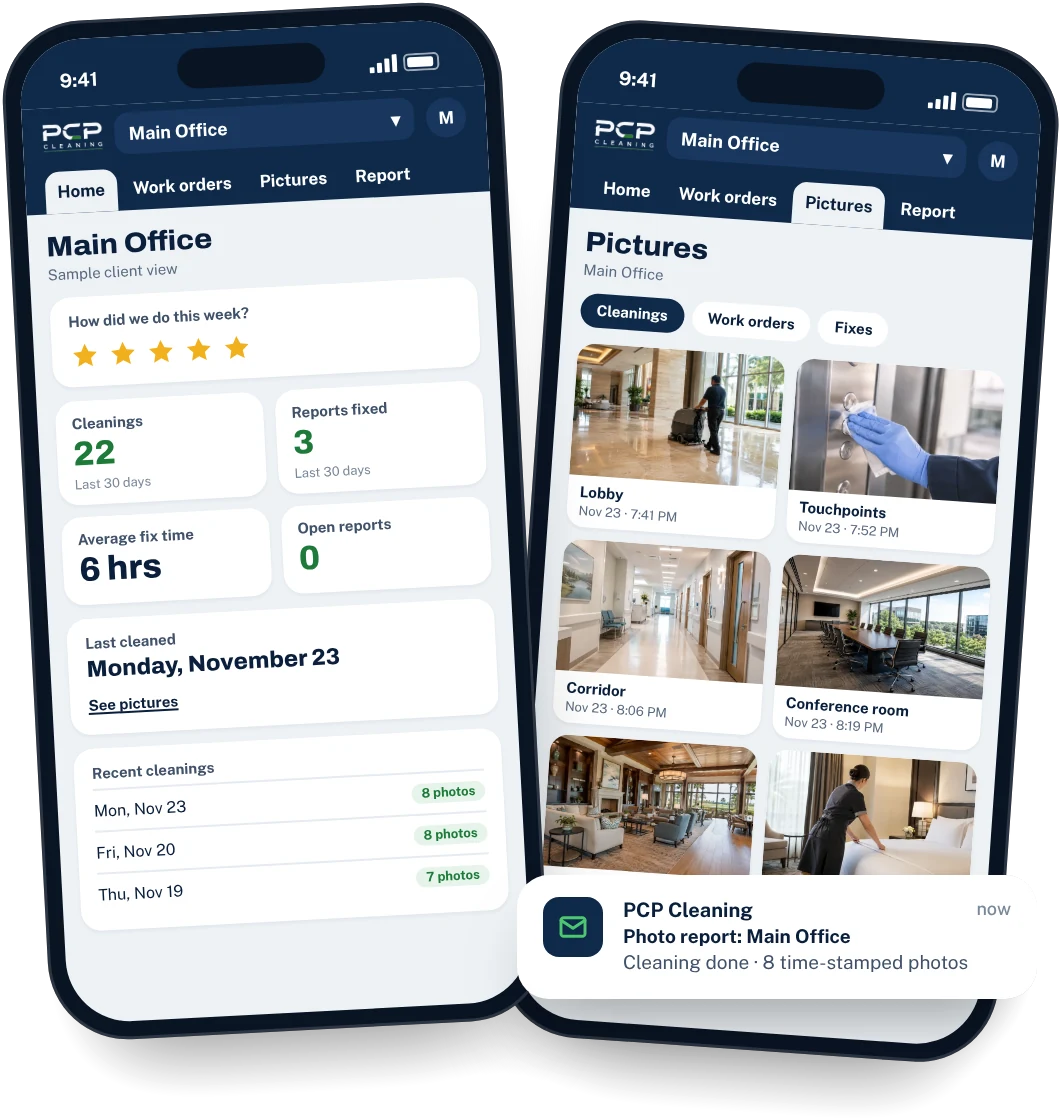
Request work in a few taps and approve the price up front. We handle the rest, and you see before-and-after photos when it’s done.
Time-stamped photos with the date, time, and address, so you can see the work without driving to the site or calling anyone.
Spot something? Send it in and our team takes it from there. If it still isn’t right, reopen it with one tap.
Photo reports land in your inbox automatically, plus email updates as your requests and reports move along. No logging in to check.
Rate each visit from 1 to 5 stars and keep a full history. A low rating alerts our team automatically, so problems get handled without you making a call.
See your cleaning schedule and recent activity at a glance, and add events like an inspection so the crew plans around them.
No more calls, texts, and emails to keep track of. Requests, issues, and updates live in one place, and our team does the follow-up.
Photos, schedules, the status of every request, and a full service history for every location, any time you want to look.
Works in your phone’s browser and adds to your home screen like an app. Available in multiple languages.
GPS check-ins, time-stamped photos, and ratings on every cleaning help us catch problems early and hold the standard at every site.
Our cleaners check in by GPS at your site and take photos stamped with the date, time, and address. Those photos show up in your portal, so you can see the work at every location without walking the building yourself.
When something isn’t right, report it in a few taps. Our team takes it from there, and you get an email update as it’s handled. No phone tag, no chasing anyone.
The portal is available to PCP Cleaning clients. Access is invite-only: PCP sets up your login once service starts, so only your team sees your locations.
Yes. One login can cover multiple locations, which makes it useful for property managers, bank branch networks, and multi-site operators.
Yes. It runs in your phone’s browser and can be added to your home screen like an app. It’s available in multiple languages.
No. Photo reports and updates come to your email automatically, and a low rating alerts our team on its own. The portal is there when you want to look, not another thing to manage.
Cleaners check in by GPS at the site and take photos stamped with the date, time, and address. You can see those photos in the portal.
Tell us about your facility. Once service starts, we set up your portal login for every location.